Free Contract Templates Word Files, Annotated and Editable
Contract templates word are editable .docx files that lay out the recurring sections of a contract so the drafter can fill in the parties, the scope, and the price without rebuilding the agreement from scratch. A working contract template word file includes a title block, recitals, definitions, scope of work, payment terms, term and termination, boilerplate, and signature blocks, and a well-drafted version closes the gaps that free gallery starters leave open.

Free Contract Templates Word, and What Free Pricing Costs You Later
Free contract templates word files are easy to find and useful as a layout shortcut. The trade-off is uneven drafting quality, missing jurisdiction-specific clauses, and no review against current statutes. Most contracts templates freesources publish a single document without indicating which state, which year, or which version of the controlling code the drafting addresses. That gap matters most in three recurring matters covered by purpose-specific templates.
Lawn Maintenance Contracts
A lawn maintenance template captures the seasonal scope, the per-visit price, the weather-cancellation rules, and the property-damage carve-outs that residential services routinely produce. Generic contract template word freefiles seldom include the seasonal scope toggle, which is the section homeowners and operators end up fighting about.
Property Management Agreements
A property management template lays out the manager's authority to lease, collect rent, hire vendors, and disburse funds, plus the indemnity owed by the owner for third-party claims. Free contract templates for free downloads rarely include the trust-account language a state real-estate commission requires.
Reliable Free Sources for a Word Contract Template
Microsoft Office Template Gallery
The shipped template chooser in Word and the create.microsoft.com web gallery expose a basic services agreement, a non-disclosure starter, and a sales contract. Strong on layout and styles, weak on jurisdiction-specific terms and dispute resolution.
Google Docs Template Chooser
Smaller catalog than Word, but the Project Proposal and Statement of Work templates can be adapted into a services contract. Best paired with a third-party add-on (DocuSign, PandaDoc) for automatic signature routing.
U.S. Small Business Administration Partners
The SBA partner network, including SCORE and the Small Business Development Centers, publishes free contract starters reviewed by volunteer attorneys. Good for vendor agreements, independent contractor agreements, and basic NDAs.
State Bar Self-Help Portals
Several state bar associations publish .docx forms for landlord-tenant, family, probate, and small-business matters. Forms are reviewed against the controlling state code. Coverage varies dramatically by jurisdiction.
Law School Clinic Websites
Transactional drafting courses and clinical programs at major law schools publish drafting exemplars used in coursework. The drafting is usually careful, but the templates are starter exemplars rather than finished forms.
Practising Law Institute and ABA Section Materials
Practitioner organization templates included with treatises and conference materials. Higher quality than generic gallery starters, but most require a section membership or a treatise purchase to access.
What Each Tier Buys You
| Tier | Relative Cost | Quality Profile | Best For |
|---|---|---|---|
| Free Word Gallery Template | No cost | Generic layout, uneven drafting, missing jurisdiction-specific clauses, no statute review. | Internal use, low-stakes agreements, drafting starters that an attorney will rewrite later. |
| Professionally Verified Template | Flat one-time fee | Professionally reviewed against current state law, includes the boilerplate that free gallery versions skip. | Recurring transactions where the parties and the deal type repeat (services, NDAs, leases). |
| Custom Professionally Drafted Agreement | Scoped quote | Drafted from scratch for the specific parties and deal terms. Negotiation-ready, with jurisdiction-specific representations and warranties. | High-stakes transactions, novel deal structures, multi-state arrangements, or anything tied to financing or M&A. |
Browse the working professionally drafted template library for the recurring document types, or commission a custom drafting quote when the deal does not fit a standard frame.
Annotated Anatomy of a Template of a Contract
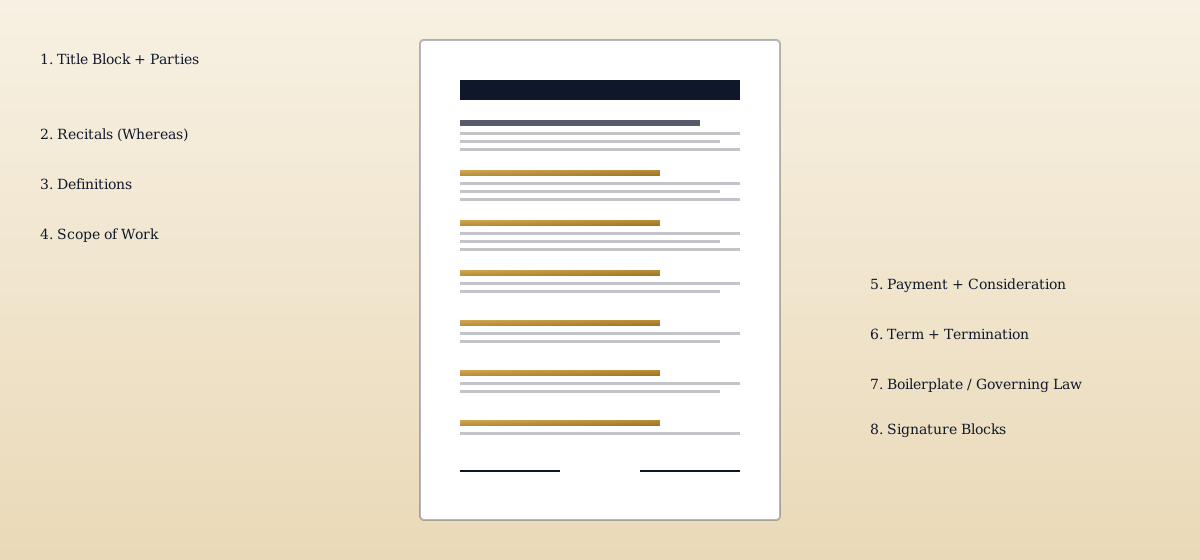
Every working template of a contract follows the same eight-section spine. Read a generic contract template from any reputable source and the order of operations holds: identify, recite, define, do, pay, end, govern, sign. The illustrations below annotate that structure on a Word .docx page so drafters can see where each section lands and why.
- 1
Title Block and Parties
The first lines identify the agreement type and the parties by full legal name, entity form, and notice address. Drafters add the effective date here so it travels with the document title.
- 2
Recitals
A short Whereas section that frames why the parties are contracting. Recitals are not operative terms, but courts read them when interpreting ambiguous operative clauses, so they must be accurate.
- 3
Definitions
Capitalized terms used throughout the contract live in a Definitions section. Pulling defined terms together prevents drift later when the same word means different things in different sections.
- 4
Scope of Work or Subject Matter
The operative core of the deal. For services it is the deliverables and timeline. For goods it is the specifications and quantities. For licensing it is the rights granted and the field of use.
- 5
Payment and Consideration
The price, the payment schedule, late-fee mechanics, and any conditions to payment. This section also captures the bargained-for exchange that satisfies the consideration element of the contract.
- 6
Term and Termination
How long the contract runs, how either party can end it for convenience or cause, and what survives termination. Survival clauses commonly carve out confidentiality, indemnity, and limitation of liability.
- 7
Boilerplate and Governing Law
Choice of law, choice of forum, dispute resolution mechanics, notice provisions, assignment, severability, integration, and amendment formality. Jurisdiction-specific drafting lives here.
- 8
Signature Blocks
Counterpart and electronic-signature language, names and titles of signatories with corporate authority to bind, and a signature date line per party. Signature pages are kept on a single page where possible.
Leasing Contracts
A leasing contract uses the same eight-section spine, but the scope section names the premises, the lease term, the base rent and any escalator, the security deposit, and the permitted use. The boilerplate adds quiet enjoyment, repair obligations, and a default-and-cure clause keyed to the controlling state landlord-tenant statute.
Long-form commercial leases run thirty pages or more once the operating-expense pass-through, holdover, subordination, and estoppel provisions are added.
Loan Contracts
A loan contract template names the borrower and lender, the principal amount, the interest rate (with a usury savings clause keyed to state ceilings), the payment schedule, the acceleration triggers, and the events of default. Secured loans add a security agreement covering the collateral and the lender's perfection rights under UCC Article 9. Promissory notes attached as exhibits incorporate the negotiable-instrument requirements of UCC Article 3.
"The formation of a contract requires a bargain in which there is a manifestation of mutual assent to the exchange and a consideration."
How a Contract Template Word File Differs From a Final Agreement
A contract template word file is an editable .docx layout that pre-positions the recurring sections of a contract and leaves blanks where the parties, the deal terms, and the jurisdictional choices need to be filled in. The template is not itself enforceable. Enforceability arrives only after the parties tailor the operative terms, sign, and exchange executed counterparts. Confusing the layout for the agreement is the most common drafting mistake in self-help contract work.
Three sub-types of contract template word files recur in everyday practice: the loan contract template, the service contract template, and the generic contract template. Each one carries a different default scope and a different set of boilerplate provisions, and a drafter who picks the wrong sub-type usually has to rebuild the agreement before signing.
Loan Contract Template Word
A loan contract template word file is built around the lender-borrower frame. The scope section is short (the loan amount and the closing date), and the operative weight sits in the interest rate, the amortization schedule, the prepayment terms, and the events of default. Secured loan templates include a parallel security agreement with the collateral description and the perfection mechanics. The choice-of-law section in a loan template is doing real work, because state usury ceilings, lender-licensing rules, and consumer-credit statutes vary considerably across jurisdictions.
Service Contract Template Word
A service contract template word file is built for a provider and a customer. The scope section is the statement of work, including deliverables, milestones, and acceptance criteria. The payment section addresses fees, expenses, milestone billings, and late charges. The boilerplate adds independent-contractor language, intellectual property assignment for work product, indemnification for third-party claims, and a limitation-of-liability cap tied to fees paid in the trailing twelve months. Service templates frequently include an SLA exhibit when uptime or response time matters.
Generic Contract Template Word
A generic contract template word file ships with the eight standard sections but no purpose-specific operative language. It is the right starting point when the deal does not fit a recurring frame, and the wrong starting point when a specialized template is available. Drafters who use a generic template for a regulated transaction (a loan, a real estate transfer, a securities offering) typically end up adding the specialized provisions back in by hand and missing some of them.
Why Drafters Reach for Contract Templates Before a Blank Page
Contract templates exist because the recurring sections of an agreement do not change much from deal to deal. The parties change, the scope changes, and the price changes, but the architecture of recitals, definitions, scope, payment, term, and boilerplate stays the same. Drafters lean on template contracts to skip the architectural work and focus on the deal-specific terms that actually need negotiation. The same logic explains why contracts template libraries exist inside law firms, in-house legal teams, and the templates for contracts collections published by bar associations.
Even with a strong template, the executed agreement still has to satisfy the seven recognized elements of a contract. Skipping any of these elements turns the signed template into a draft with no enforceable substance. The templates of contracts published in bar-association libraries assume the drafter handles the seven elements at the table; the template itself does not guarantee they are satisfied.
Offer
A definite promise on definite terms communicated to the offeree.
Acceptance
Unqualified assent to those terms in the manner the offer permits.
Consideration
Bargained-for exchange of value between the parties.
Mutual Assent
Both sides understood and agreed to the same essential terms.
Capacity
Both parties were legally able to contract; minors and incapacitated persons are excluded.
Legality
The subject matter and the performance must be lawful.
Writing
Required where the statute of frauds applies, including sales of goods over $500 and real-property transfers.
Three Patterns That Break a Template-Based Contract
First, leaving placeholder text in the executed copy (party names, dollar amounts, defined terms) is a recurring drafting failure that creates ambiguity at enforcement. Second, mixing two templates with inconsistent governing-law and dispute-resolution provisions produces a forum fight in any subsequent dispute. Third, signing the template without removing drafter notes or commentary copies the drafter's guidance into the operative agreement, which can be used against the drafting party in a later breach action. Courts treat ambiguous executed templates strictly: any drafter notes left in the body or pasted commentary tend to be read against the side that prepared the document when one party later sues for performance.
Editing a Word Contract Template Without Breaking It
The .docx format is the working medium of contract drafting, and most template failures are Word failures rather than legal ones: stale cross-references, half-finished find-and-replace sweeps, tracked changes that travel with the file, and executed copies that were never locked. Six habits keep a contract template word file safe from open to signature.
Styles and Automatic Numbering
Build section numbering with Word's Heading styles and a linked multilevel list, never by typing numbers. Insert internal references through Insert, then Cross-reference, so a citation to Section 7.2 renumbers itself when a clause is added. Select all and press F9 to refresh every field before circulating a draft.
Defined-Terms Consistency
Find and Replace is how defined terms drift. Replacing Contractor with Consultant without Match Case and Find Whole Words Only also rewrites Subcontractor and lowercase uses, leaving a mixed vocabulary that reads as two different parties. After any global replace, search the document for both the old and new terms to confirm the sweep was clean.
Tracked Changes, Comments, and Metadata
Accept all changes, stop tracking, and delete every comment before a draft leaves the building. Then run the Document Inspector to strip hidden text, revision fragments, author names, and document properties. Redline history and margin comments have handed counterparties a map of the drafter's fallback positions more than once.
Locking the Execution Copy
Apply Restrict Editing to the final Word draft, then convert it to PDF for signature. Parties sign the PDF rather than the editable .docx because a Word file can change after signing, and neither side can then prove which text the signatures were applied to.
Version Control and Compare Documents
Number drafts in the filename (v1, v2, execution) and generate redlines with Review, then Compare, which produces a marked comparison of any two drafts. A machine-generated comparison catches the silent edit a manual read misses, which is why attorneys run Compare on every returned draft before responding.
Merge Fields for Repeat Agreements
When the same agreement issues repeatedly with only the party, date, and price changing, mail merge fields fill those slots from a spreadsheet row instead of hand-editing each copy. Merge output still needs a per-deal read: the fields fill correctly, but deal-specific terms do not draft themselves.
Placeholders, Exhibits, and File-Format Traps
Keep every unfilled slot in a template inside bracketed all-caps placeholders such as [PARTY NAME] and [PURCHASE PRICE], then run a search for the opening bracket character as the last step before signature; a single surviving bracket means the fill pass is not finished. Exhibits and schedules can live inside the .docx or as separate files, and each choice has a failure mode: embedded exhibits bloat the file and break pagination, while separate files get orphaned at execution unless the body expressly identifies each exhibit and states that it is attached and incorporated by reference. On format, save working drafts as .docx rather than the legacy .doc, and treat a Google Docs round trip as a formatting risk: automatic numbering, cross-references, and styled tables of contents often degrade on the way back into Word. The structural sections the placeholders feed are covered in the general contract template walkthrough.
Accessibility and Electronic Signing of the Final Document
A contract built on true Heading styles is also an accessible one: the style outline doubles as screen-reader navigation, and Word's Accessibility Checker (Review tab) flags missing alternative text and low-contrast formatting before the file is exported as a tagged PDF. When the execution copy is signed electronically, the signature is valid under the federal ESIGN Act and the state UETA statutes; the enforceability mechanics, consent requirements, and record-retention rules for e-signed agreements are treated in depth in the universal agreement skeleton guide.
Where Templates Hand Off to Drafting Work
A working template gets the layout right, but the deal-specific redlining usually requires a hand from a drafter. The doctrinal companion piece is the laws of contracts guide, which covers formation, performance, breach, and remedies in the order a drafter actually moves through them. Specialized fee-arrangement contracts (the kind that turn legal services into outcome-based payment) are covered separately on the damages-based agreements guide. When the document being drafted is a marital agreement rather than a commercial one, the prenuptial agreement drafting service handles the drafting end-to-end at a fixed quote.
Common Questions About Contract Templates in Word
Does Microsoft Office have contract templates?
How do I make a contract in Word?
Where can I get free contract templates?
What are the 7 basic elements of a contract?
Does Google Docs have a contract template?
Where can I find a free Word document template?
How do I remove tracked changes and comments from a Word contract?
Should a contract be signed as a Word document or a PDF?
What is the difference between .doc and .docx for a contract?
Need a Contract That Fits the Actual Deal?
Templates are layout shortcuts. When the parties, the dollar amount, or the jurisdiction matters, Legal Tank drafts the agreement against current state law and your specific deal terms, with reps, warranties, and dispute-resolution language tailored to the transaction.